When Copy Means Compromise: How kubectl cp Enables RCE on Windows
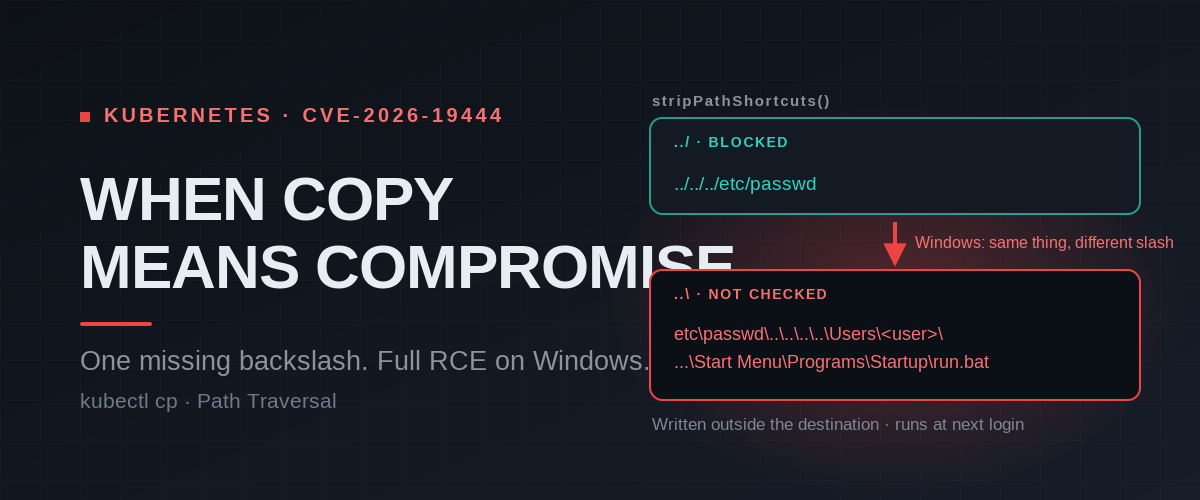
A single missing backslash turns a routine “copy a file from a pod” into remote code execution on Windows admin machines — here’s how it works, and how to shut it down.
TL;DR
Running kubectl cp from a Windows machine lets a malicious container write files anywhere on the client, well outside the intended destination folder. The safety check that is supposed to prevent this blocks Unix-style path traversal (../) but completely ignores the Windows equivalent (..\).
That means a compromised pod can drop an executable straight onto a Windows workstation. On the next reboot or login, the attacker’s code runs, giving them full control of the machine.
What is kubectl cp?
Kubernetes is the de facto platform for running containerized applications at scale. kubectl is the command-line tool used to talk to a cluster, and kubectl cp is the sub-command that copies files between your local machine and a running container.
Under the hood, kubectl cp runs tar inside the pod, streams the resulting archive back to the client, and unpacks it into the destination directory you chose.
The Trust Assumption That Breaks
When you pull data out of a pod, you naturally assume you are in control. You are not. The pod controls the stream, including every filename inside the archive. If an attacker controls the pod — through a compromised application, a malicious base image, or a supply-chain breach — they control those filenames. And a carefully crafted filename becomes a weapon.
Root Cause
When unpacking the archive, kubectl validates each entry with isRelative(), which relies on stripPathShortcuts() to strip traversal sequences before deciding whether the target path stays inside the destination. Here is the heart of the vulnerability:
func stripPathShortcuts(p string) string {
    newPath := p
    trimmed := strings.TrimPrefix(newPath, "../")   // <-- POSIX only
    for trimmed != newPath {
        newPath = trimmed
        trimmed = strings.TrimPrefix(newPath, "../") // <-- POSIX only
    }
    // ...
}

func isRelative(base, target localPath) bool {
    relative, err := filepath.Rel(base.String(), target.String())
    if err != nil { return false }
    return relative == "." || relative == stripPathShortcuts(relative)
}
The guard blocks ../ but is blind to ..\, and Windows happily treats ..\ as “go up a directory.” The check that’s supposed to keep files inside your folder becomes a rubber stamp.
The Attack Chain, Step by Step
Here’s how the pieces fit together conceptually.
- Gain a foothold in a pod. The attacker gets control of a container — via a compromised application, a poisoned image, or lateral movement inside the cluster.
- Rig the archive source. Because
kubectl cpshells out totarinside the pod, the attacker replaces or wrapstarso that any copy request returns an archive of their choosing. -
Poison the filenames. The archive contains an entry that uses Windows backslash traversal to escape the destination directory and target a sensitive location, such as the user’s Startup folder:
Legitimate entry: etc\passwd Malicious entry: etc\passwd\..\..\..\..\Users\<user>\AppData\Roaming\ Microsoft\Windows\Start Menu\Programs\Startup\run.bat - The victim runs a normal command. The user routinely copies a config or log file from the pod to a local folder, exactly as they do every day.
- The guards fail.
isRelative()does not recognize backslash traversal. The crafted path passes validation and the file is written outside the destination folder, straight into Startup. - Code runs on the next login. Anything in the Startup folder executes at the next login or reboot. The attacker now has code execution on the workstation.
The Startup folder is the cleanest example, but an arbitrary file write is much broader than that. Overwriting local scripts, system configuration files, or trusted binaries turns routine developer workflows into execution triggers.
Proof of Concept
The video shows a routine kubectl cp from a pod to a local folder on a Windows client. The pod returns a tar archive with a backslash-traversal filename, the client writes the file outside the chosen destination into the user’s Startup folder, and the dropped payload executes on the next login.
Why This Matters
- Workstation Compromise: The people running
kubectl cpare usually cluster administrators. Their machines hold broad cluster credentials, cloud tokens, and SSH keys. Turning a log pull into code execution hands the attacker exactly the high-privilege keys they want. - CI/CD Blast Radius: Automated Windows build nodes that run
kubectl cpas part of a pipeline can be hijacked by a single malicious pod. Compromising the runner poisons every downstream release, escalating a cluster foothold into a supply-chain breach. - Broken Trust: Administrators treat
kubectlas a safe, boring tool. Exploiting the gap between its expected behavior and an arbitrary file write lets the attack hide in plain sight, inside a command nobody thinks twice about.
Am I Affected?
You are potentially exposed if all of the following are true:
- You run
kubectl cpfrom a Windows client - You copy files out of pods that could be attacker-influenced (untrusted images, multi-tenant clusters, internet-facing workloads)
- You are running a
kubectlversion prior to the fixed release
Check your client version:
kubectl version --client
Upgrade to kubectl version 1.34.12, 1.35.9, or 1.36.5 and above. Any Windows CI/CD runner or admin workstation that uses kubectl cp should be treated as in scope for immediate remediation.
Key Takeaways
- Pulling data out of a container hands control of file metadata to the pod. Relying on default client-side checks for untrusted streams exposes your infrastructure to arbitrary file writes.
- Windows admin workstations and CI/CD build nodes need immediate remediation to prevent privilege escalation and supply-chain compromise.
- Upgrade kubectl to patched versions 1.34.12, 1.35.9, or 1.36.5.